
When AI confidence is 90% or higher, new incoming transactions are automatically categorized and posted (you can turn this feature off in settings in the transactions table). All other transactions remain in the Review tab, waiting to be categorized. This is your starting point for keeping your client's books current and accurate.
Steps
- Go to your client's Transactions page and click the Review tab
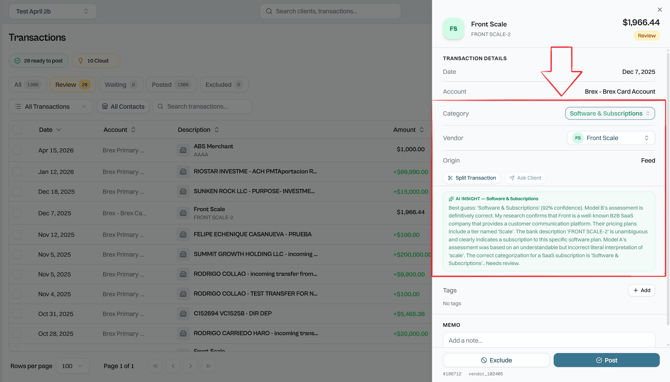
- Find the transaction you want to categorize and click on it
- In the right-size panel, you can review the AI Insight, which contains the AI categorization explanation
- Choose a new category from the drop-down menu, you will see all your accounts from the Chart of Accounts
- Changes are executed immediately.
- Click Post to finalize
💡 Tip: You can select multiple transactions and post them all at once. Once you're done categorizing a batch, check all their boxes and click Post in one go to save time.
Related Articles