
The Trial Balance report lists all accounts with their debit and credit balances for a selected period — giving you a quick way to verify that your client's books are balanced before closing a period or preparing financial statements. If debits and credits don't match, the Trial Balance is where you catch it.
Steps
- Go to Reporting → Trial Balance in the left sidebar
- Click Report Period to select a predefined period, or set a custom range using the From and To date fields — the report loads automatically
- To export, click the Export to toggle in the upper right and choose your format: PDF, Excel, DOCX, or Headerless CSV
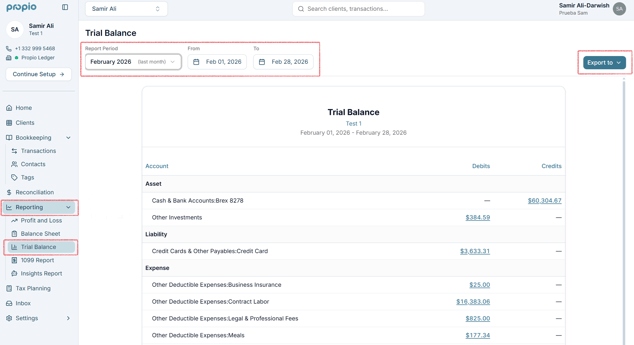
💡 Tip: Any dollar amount in the report is clickable (shown in blue and underlined). Click it to drill down into the individual transactions that make up that figure — for example, clicking the total for Wages shows every transaction included in that amount. See Drill Down from Reports to Transactions for the full guide.
Related Articles