
Your Balance Sheet, Your Way. Mapped to the Right Tax Form Automatically.
If you've ever opened a client's Balance Sheet in QuickBooks and wondered where the Retained Earnings number came from, you're not alone. The way equity accounts work across different entity types is one of the most misunderstood areas in small business bookkeeping. And when your software handles it inconsistently, year-end becomes a headache.
Here's how Propio handles it — and why it matters for your practice.
Three Numbers, One Story
Every business Balance Sheet tells the same equity story with three core pieces:
- Owner's Capital (or Partners' Capital, or Shareholder Equity) — what the owners have put in and accumulated over the life of the business
- Retained Earnings — cumulative profit from all prior years that stayed in the business
- Net Income — what the business has earned in the current year
Together, these three answer one question: How much is this business worth to its owners right now?
What Happens at Year-End
This is where most of the confusion lives.
When a new fiscal year starts, Propio automatically moves the prior year's Net Income into Retained Earnings — no Journal Entry required. It happens in the reporting layer, instantly and dynamically. The total equity doesn't change. The money doesn't move. Propio simply splits the number at the fiscal-year boundary so your Balance Sheet reflects what accountants expect to see: prior-year profits in Retained Earnings, and current-year profits in Net Income.
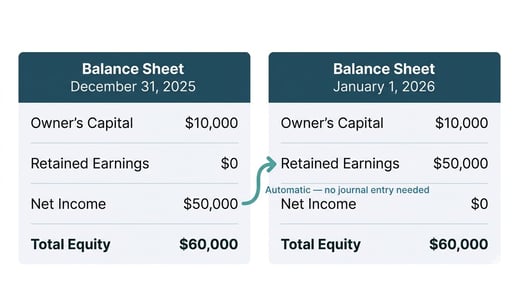
Why Dynamic Matters
Some systems create a Journal Entry to "close" Net Income into Retained Earnings at year-end. That approach has a problem: if you post a transaction to a prior year — which happens all the time during tax season — the closing entry is now wrong.
Propio calculates this split in real time. Change a transaction from last March? Retained Earnings updates instantly. No reversing entries. No cleanup. Your Balance Sheet is always accurate, even when prior periods change.
How It Works Across Entity Types
Not every entity type treats equity the same way on the tax return. Propio handles the differences automatically through its tax line mapping, so you always see the right accounts for each client.
Schedule C — Sole Proprietors
The IRS does not require a Balance Sheet for Schedule C filers — there is no Schedule L, no equity section on the form. But accountants still want to see one for internal reporting and client conversations.
Propio includes Owner's Capital, Retained Earnings, and Net Income in the Schedule C Chart of Accounts for your convenience. They simply have no tax line mapping because there is no form line to map to. The P&L still flows to Schedule C Lines 1 through 31 on Form 1040, exactly as expected.
Example: Carlos runs a landscaping business as a sole proprietor. His Balance Sheet in Propio shows $85,000 in Retained Earnings and $32,000 in Net Income for the current year. These numbers help his accountant track the business's health — but they don't appear on any tax form.
Form 1065 — Partnerships
Partnerships require a Balance Sheet on Schedule L, but the equity section has only one line: Line 21, Partners' Capital Accounts. There is no separate Retained Earnings line on the IRS form.
In Propio, the Chart of Accounts still shows Partners' Capital and Retained Earnings as separate accounts — the accountant sees the familiar breakdown on the Balance Sheet. But when the data maps to the tax form, both accounts roll up into Schedule L, Line 21. Schedule M-2 (Analysis of Partners' Capital Accounts) is fed directly from this structure.
Example: Ana and Luis are 50/50 partners in a restaurant. At year-end, their Propio Balance Sheet shows $120,000 in Retained Earnings and $45,000 in Net Income. On Schedule L Line 21, the IRS treats $165,000 as a single Partners' Capital number.
Form 1120-S and Form 1120 — S-Corps and C-Corps
This is the only entity type in which Retained Earnings is an actual required line on the tax form. Schedule L includes Line 22 (retained earnings, appropriated), Line 23 (retained earnings, unappropriated), and Line 24 (adjustments to shareholders' equity). Propio maps Retained Earnings directly to Schedule L, Line 23.
Example: Sofia's S-corp had $200,000 in Retained Earnings at the start of 2025 and earned $75,000 in Net Income during the year. On January 1, 2026, the $75,000 rolls into Retained Earnings, which now shows $275,000 — mapped directly to Schedule L, Line 23 on her Form 1120-S.
One Structure, Four Tax Forms
Propio uses the same equity account structure for every entity type. The only thing that changes is where each account maps on the tax form.
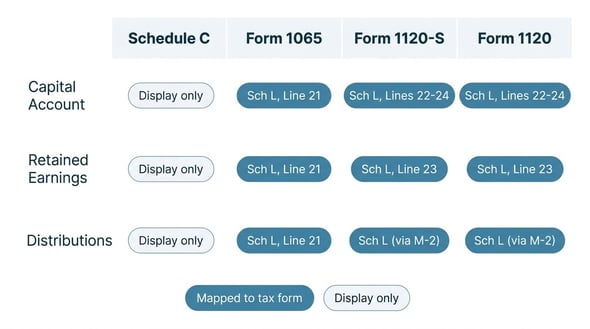
You see the same clean Balance Sheet for every client. Propio handles the tax form differences behind the scenes.
What This Means for Your Practice
No more manual closing entries at year-end. No more confusion about whether Retained Earnings is "right" for a partnership or a sole prop. No more QuickBooks mysteries where a number changes and you can't trace it.
Your Balance Sheet is always current, always accurate, and always mapped to the correct tax form line. That's tax-basis bookkeeping the way it should work.
💡 Tip: Because Propio calculates the Net Income → Retained Earnings split dynamically, you can post transactions to prior periods at any point during tax season without worrying about closing entries being wrong. Your Balance Sheet self-corrects in real time.
Related Articles