
Bank reconciliation confirms that your client's books in Propio match the actual bank records. For clients without a connected bank account, you can reconcile by uploading their bank statement and matching the extracted lines against your ledger — giving you the same reconciliation checkpoint without requiring a direct bank connection.
Before You Start
Two steps are required before you can reconcile:
- Create a manual bank account — Go to the client's Bank Accounts section and click + Add Bank Account → Manual Bank Account. Select the Account Type (Depository or Credit), the Account Subtype (e.g., Checking, Savings, Credit Card), and give it a name (e.g., CHASE 9636).
- Upload the bank statement — You can upload the PDF directly from the reconciliation detail page once you open a month, or from the client's Transactions page. See Import Transactions from Bank Statements for the full upload guide.
Steps
- Click Reconciliation in the left sidebar. Manual bank accounts appear in the matrix alongside any connected accounts, with the same color-coded monthly timeline.
- Hover over the next pending month and click Start Review (if there's a discrepancy) or Finalize Reconciliation (if the balance already matches).
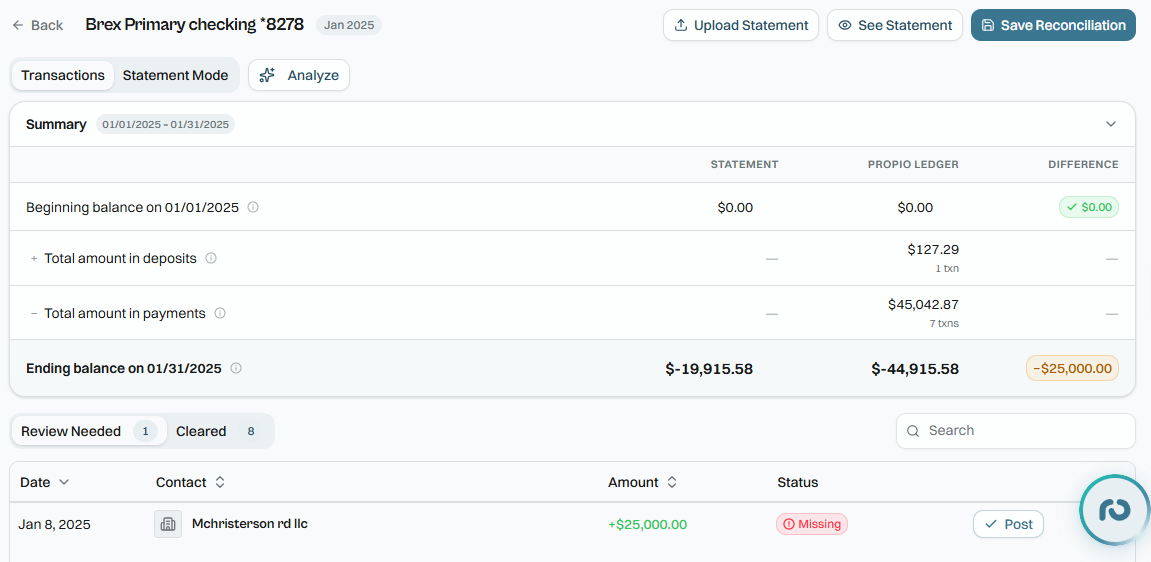
- On the reconciliation detail page, click Statement Mode. This opens a split view:
- Left panel — the uploaded PDF bank statement (or extracted line items if you switch to Lines view).
- Right panel — your ledger transactions for that period.
- Propio runs auto-matching automatically when the statement loads — it scores each statement line against your ledger entries and links the high-confidence matches. A progress bar at the top shows how many lines are matched, skipped, and remaining.
- Review the exceptions — lines the auto-match couldn't resolve. Select the statement line and its matching ledger transaction, then click Link Match. Skip anything that has no match yet; it will carry into the next period.
- The Balance Summary panel at the top of Statement Mode shows the statement's opening and closing balances alongside your ledger's opening and closing balances. Verify these match before finalizing.
- Once all exceptions are resolved, click Finish Review to finalize the period. Propio records the reconciliation date and automatically locks that period, preventing further edits to transactions dated on or before it.
🔒 Period lock system: If you attempt to edit a transaction that belongs to a finalized period, Propio will warn you before allowing the change. Administrators can unlock a period when needed — doing so returns it to "Needs Re-Review" status and it will need to be reconciled again.
Tip: Reconcile monthly rather than at year-end. Catching a discrepancy in the same month it occurs takes minutes to resolve — catching it six months later can take hours.
Using the AI Assistant
From Statement Mode, click Analyze to open the AI assistant. The assistant has full context of the current reconciliation — the account, period, matched and unmatched line counts, and balances — and can help you identify the source of a discrepancy, flag suspicious lines, or summarize the state of the reconciliation without having to scan every line manually.
Common Issues
-
Balance summary doesn't match? Confirm the beginning balance is correct — an error in a prior period carries forward. Also check that the uploaded statement covers the exact same date range as the reconciliation period.
-
No statement showing in Statement Mode? Upload the PDF directly from Statement Mode using the upload prompt, or go to the Transactions page and upload it from there.
-
Discrepancy won't close after matching all lines? Check for duplicate transactions, bank fees not recorded in Propio, or transfers that weren't properly matched. Click Analyze to have the AI assistant review the period and surface likely causes.
-
Beginning balance doesn't match? Make sure the previous month was reconciled correctly — errors in prior periods carry forward into the current period's starting balance.